
How to Use Inkjet Transparency Film
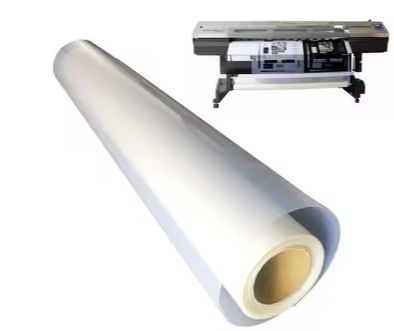
How to Use Inkjet Transparency Film: A Complete Guide for Screen Printing and Professional Applications
Inkjet transparency film plays a critical role in modern printing workflows, especially for screen printing, graphic reproduction, stencil making, and visual presentations. When used correctly, it delivers sharp image detail, accurate ink density, and consistent results across a wide range of applications.
This comprehensive guide explains how to use inkjet transparency film properly, covering printer compatibility, film types, waterproof inkjet film advantages, printing settings, handling techniques, and best practices for screen printing professionals. Whether you are a beginner or an experienced printer, understanding how inkjet film works will significantly improve your output quality.
What Is Inkjet Transparency Film?
Inkjet transparency film is a specialized polyester-based film coated with an ink-receptive layer designed specifically for inkjet printers. Unlike standard clear plastic sheets, this coating allows liquid ink to adhere, dry evenly, and remain stable without smearing.
Inkjet transparency film is commonly used for:
-
Screen printing positives
-
Stencil creation
-
Overhead projection
-
Graphic overlays
-
Technical drawings and visual proofs
For screen printing in particular, inkjet film is essential for producing high-opacity film positives, which directly impact exposure quality and stencil accuracy.

Inkjet Film vs Transparency Film: Is There a Difference?
In practice, the terms inkjet film and transparency film are often used interchangeably. However, from a professional standpoint, there are subtle but important distinctions.
-
Inkjet Film generally refers to film engineered specifically for inkjet printing, often optimized for screen printing positives.
-
Transparency Film is a broader category that includes projection films, presentation films, and both inkjet- and laser-compatible products.
For screen printing and precision work, always choose inkjet-specific transparency film, as general-purpose transparency sheets may lack sufficient ink absorption and opacity.
Types of Inkjet Transparency Film
Choosing the right film type is crucial for achieving consistent, professional results. Below are the most common categories used in commercial and creative environments.
1. Clear Inkjet Transparency Film
Clear transparency film offers maximum light transmission and is widely used for:
-
Overhead projector presentations
-
Fine line artwork
-
Technical drawings
-
Screen printing film positives
Advantages:
-
Excellent clarity
-
High resolution detail
-
Ideal for exposure-based processes
Limitations:
-
May require higher ink density to achieve deep black opacity
-
Longer drying time compared to coated films
Clear film is best suited for environments where precision and light control are essential.
2. Milky or Matte Transparency Film
Milky transparency film features a slightly frosted or matte coating, designed to improve ink absorption and drying speed.
Advantages:
-
Faster drying
-
Reduced smudging
-
Better color density with standard ink settings
Common Uses:
-
Color graphics
-
Proofing
-
General inkjet printing applications
This type is often preferred when ease of use and quick turnaround are priorities.
3. Waterproof Inkjet Film
Waterproof inkjet film represents the most advanced category and is highly recommended for professional screen printing.
This film uses multi-layer coating technology that allows ink to dry rapidly while maintaining high opacity and water resistance.
Key Benefits of Waterproof Inkjet Film:
-
Smudge-resistant surface
-
Moisture resistance
-
Ultra-fast drying
-
Excellent black density for film positives
Waterproof inkjet film is particularly valuable in humid environments or production settings where films are handled frequently.
Why Waterproof Inkjet Film Is Preferred for Screen Printing
In screen printing, the quality of the film positive directly affects:
-
Exposure accuracy
-
Emulsion hardening
-
Edge sharpness
-
Detail reproduction
Waterproof inkjet film minimizes common issues such as:
-
Ink bleeding
-
Fingerprint marks
-
Ink reactivation from moisture
-
Uneven exposure caused by translucent blacks
For professional printers, waterproof inkjet film offers greater consistency and reliability, especially when producing halftones or fine line artwork.

Printer Compatibility: What Printers Work with Inkjet Film?
Inkjet Printers
Most modern inkjet printers are compatible with inkjet transparency film, including models from:
-
Epson
-
Canon
-
HP
Inkjet printers work by spraying liquid ink, which the film’s coating absorbs and holds in place.
Best Practice:
Always confirm that your printer supports specialty media or transparency printing.
Laser Printers (Use with Caution)
Laser printers use heat to fuse toner onto media. Standard inkjet transparency film is not designed for high temperatures and may warp or melt.
If using a laser printer:
-
Only use laser-compatible transparency film
-
Never run inkjet film through a laser printer
Recommended Printer Settings for Inkjet Transparency Film
Correct printer settings are essential for achieving sharp and durable results.
Media Type Settings
-
Select Photo Paper, Premium Photo Paper, or Transparency if available
-
Avoid “Plain Paper” or “Draft” mode
Print Quality
-
Use High Quality or Best Quality
-
Higher ink density improves opacity for screen printing film positives
Ink Density Adjustment
For screen printing:
-
Increase black ink density if your RIP or printer software allows
-
This ensures maximum UV light blockage during exposure
How to Load Inkjet Transparency Film Correctly
Most inkjet transparency films have one printable side, typically identified by:
-
A slightly textured surface
-
A corner notch
-
Manufacturer markings
Always print on the coated side.
Printing on the wrong side will result in:
-
Poor ink adhesion
-
Excessive drying time
-
Smudging
Drying Time and Handling Best Practices
Drying Recommendations
-
Remove each sheet immediately after printing
-
Lay flat in a dust-free environment
-
Allow at least 10–15 minutes drying time
-
For waterproof inkjet film, drying is often much faster
Handling Tips
-
Handle by the edges only
-
Avoid stacking freshly printed films
-
Do not touch the ink surface until fully dry
Using Inkjet Transparency Film for Screen Printing
Inkjet transparency film is the industry standard for creating film positives used in screen exposure.
Typical Screen Printing Workflow
-
Print artwork onto inkjet film
-
Ensure high black opacity
-
Place film on emulsion-coated screen
-
Expose under UV light
-
Wash out image to create stencil
Using high-quality screen printing film ensures:
-
Clean stencil edges
-
Accurate exposure times
-
Repeatable results
Cutting, Reusing, and Stencil Applications
Inkjet transparency film can also be used for:
-
Manual stencils
-
Craft cutting
-
Prototyping
Cutting Tips:
-
Use a sharp X-ACTO knife
-
Cut on a self-healing cutting mat
-
Avoid excessive bending
While reusing printed transparency film is possible, reused sheets may show reduced clarity and should not be relied upon for precision exposure work.

Storage Guidelines for Inkjet Film
Proper storage extends the lifespan of transparency film.
-
Store flat
-
Keep sealed in original packaging
-
Maintain low humidity
-
Avoid direct sunlight and heat exposure
Improper storage can cause curling, moisture absorption, and coating degradation.
Frequently Asked Questions
Can inkjet printers print on transparency film?
Yes, as long as the film is designed specifically for inkjet printers.
Is waterproof inkjet film necessary?
For professional screen printing and humid environments, waterproof inkjet film is strongly recommended.
Can transparency film be reused?
It can be reused for stencils or testing, but not ideal for high-precision screen printing.
Conclusion
Inkjet transparency film is a critical material for screen printing, graphic production, and professional printing applications. Understanding the differences between inkjet film types—especially the advantages of waterproof inkjet film—allows you to achieve sharper detail, better ink density, and more reliable results.
By choosing the correct transparency film, optimizing printer settings, and following proper handling practices, you can significantly improve print quality and production efficiency.
Whether you are producing screen printing positives, technical overlays, or visual graphics, high-quality inkjet transparency film ensures your work meets professional standards—every time.
Celebrating Chinese New Year 2026
How to Choose Mesh Count for Screen Printing
Related Article


