Why Do DTF Transfers Peel or Crack After Washing?
Why Do DTF Transfers Peel or Crack After Washing?
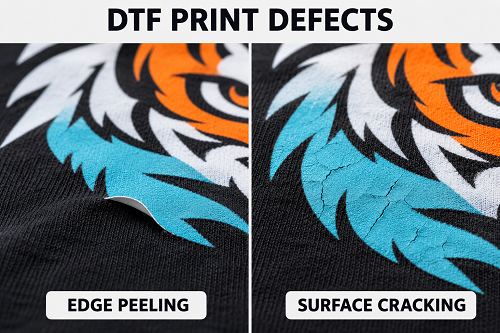
A DTF transfer can look fine when it comes off the heat press and still lift or crack in the wash. If the edges peel, start by checking heat, time, and pressure at the point where the print lifted. If the print cracks while the edges stay down, check how the design stretches with the garment and review how it was washed and dried. Ten washes is a useful checkpoint if it suits your test plan. It takes a documented wash test on the finished garment to know how your particular transfer will hold up.
DTF Troubleshooting at a Glance
| What you see | What to check first | How to narrow it down |
|---|---|---|
| Edges lift in one corner or near a seam | Uneven pressure or contact with the platen | Press the same design on a flat area of the same garment style and compare after washing. |
| Small details stay on the carrier during peeling | Peel timing and whether those details received full contact | Confirm the specified hot, warm, or cold peel and repeat on a fresh sample. |
| Several edges lift after washing | Application settings, material compatibility, and wash conditions | Check actual platen temperature and repeat the test on a sample pressed within the supplier's specified range. |
| Fine cracks appear across a solid print while the edges stay down | Transfer flexibility, fabric stretch, and drying conditions | Compare a washed sample with an unwashed sample using the same gentle stretch. |
Why Are My DTF Transfers Peeling After Washing?
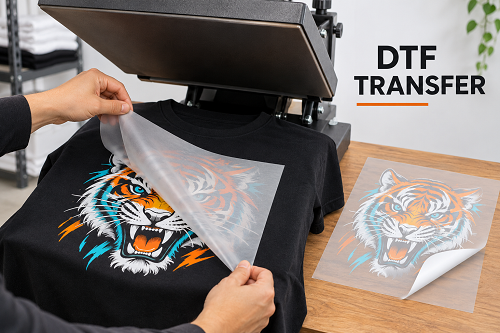
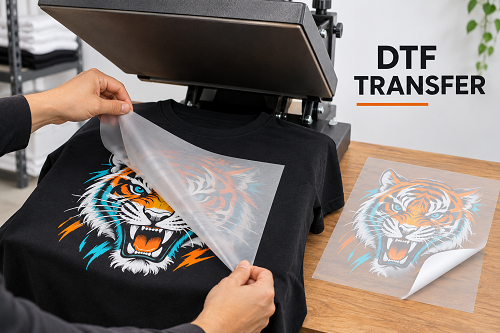
In textile direct-to-film printing, the PET film carries the printed design until application. The design typically consists of color ink, a white underbase, and a hot-melt adhesive. During pressing, heat softens or melts the adhesive so it can bond to the fabric. The PET carrier is removed at the specified peel temperature, leaving the ink and adhesive on the garment. An edge that lifts after washing gives you a location to investigate. Start there.
Check actual temperature and pressure across the design
Start with the application sheet for the exact transfer and fabric. Check the press timer and verify the platen temperature using the press manufacturer's recommended method. If the same corner lifts across several garments, compare the temperature and pressure at that position with the center. Raised seams, zippers, and pockets can keep the platen from making even contact. Run a test on a flat area using the same garment and transfer. A difference between the two locations helps isolate a contact problem. DTF heat press instructions and troubleshooting
Check peel timing and the transfer batch
Some DTF systems specify a hot peel, while others specify cooling before the carrier is removed. Some also call for a finishing press after peeling. Follow the instructions for the transfer in use and log each step so operators can reproduce it. If your shop makes transfers in-house, compare a suspect transfer with one from a known good batch. Keep the garment and press setup the same, then check powder coverage and the adhesive heating step against your material instructions if the problem follows the batch. Hot-peel application example · Cold-peel application example
Why Do DTF Transfers Crack After Washing?
Cracks through the face of the print point you toward a different set of checks. A garment can stretch and fold during wear, washing, and drying. If the transfer cannot move with it, cracks may show up first across a large solid area or a spot that stretches repeatedly. Compare a small logo and a large solid design on the same garment. If only the solid print cracks under the same conditions, test a transfer intended for the fabric's stretch or try artwork with smaller solid areas. Verify the revised combination on a fresh sample before changing the production setup. Transfer stretch and fabric troubleshooting
Wash and dry conditions can also help explain when the damage appears. If a sample looks intact after pressing and gentle handling, compare identical garments washed according to the approved care instructions. When investigating a customer return, document the customer's wash and dry routine and compare it with the approved routine, changing one condition at a time. Give customers instructions that both the transfer supplier and garment allow. Where compatible, washing inside out on a cool, gentle cycle and air-drying can reduce direct rubbing and exposure to high dryer heat. DTF wash-care instructions
How to Test DTF Wash Durability Before Production
Use the actual garment style and production artwork, especially if the design includes fine lettering, solid areas, or placement near a seam. Test several samples when feasible and keep one pressed sample unwashed as a reference. If the customer specifies a wash-test method or acceptance criteria, use those for approval. For an internal shop check, use a consistent routine and record enough detail to repeat it.
- Record the setup. Note the garment style and fabric, transfer batch, design placement, actual platen temperature, press time, pressure setting, peel timing, and any finishing press.
- Photograph the baseline. Take a full photo of the print and close-ups of the edges, fine details, and largest solid area.
- Wash and dry consistently. Follow the specified wait before first washing. Record the wash program, water temperature, detergent, load, and drying method.
- Inspect at planned intervals. Check the garment once dry. Photograph the same areas under similar lighting and record the first sign of edge lift, cracking, flaking, or fading. A shop can use checkpoints such as washes 1, 5, and 10 to track when a defect starts.
- Change one variable and retest. If the sample fails, make one controlled change on a fresh garment, such as moving the design away from a seam or adjusting the pressure within the recommended range. Repeat the same wash routine before approving the job.
Frequently Asked Questions
Can I re-press a DTF print that has already peeled in the wash?
Ask the transfer supplier whether it offers a repair procedure. A finishing press during application and a repair after laundering are different operations. If you try an approved repair, wash-test the repaired sample before using that procedure on customer garments.
Should I repeat the wash test when switching blank garment suppliers?
Yes. Two shirts can have the same fiber label and still differ in knit, stretch, or surface finish. Recheck the actual blank whenever the garment changes, even if the artwork and transfer batch stay the same.
What should I send my supplier when a transfer fails?
Send a photo of the full print and a close-up of the defect. Include the garment style and fabric, transfer batch, press settings, peel timing, and wash and dry conditions. Mention whether the defect appeared during peeling, after the first wash, or only after repeated washing.
Request DTF Samples for a Production Trial
Planning a bulk run? Share your garment fabric, artwork size, press setup, and wash requirements when requesting DTF material samples and a quote. Ask for the application instructions, sample availability, minimum order quantity, and lead time so you can test the combination before committing to production.
CMS notes
- Internal links. If those pages exist, link “PET film” in the peeling section to the DTF transfer film page, “powder coverage” to the DTF hot-melt powder page, and “application sheet” to the relevant heat press guide. Add a link back to this article from the most relevant existing DTF guide.
- Original photos. Use close-ups of an actual lifted edge and actual surface cracking if available. Example alt text for matching photos includes “DTF transfer lifting at the corner of a cotton T-shirt” and “Fine cracks across a solid DTF print after washing.”
- Test evidence. The wash-test section describes a repeatable shop procedure. Add your own sample photos and results once available, along with the name and role of the person who performed or reviewed the test.
How to Screen Print a Hoodie in One Color
How to Clean Screen Printing Frames: A Practical Guide
Related Article